Block Craft - Building World
- 4.1
- Rating
- 1.00M
- Installs
- Free
- Price
 Analysis by App-foxy
I approached Block Craft - Building World expecting a familiar block-building sandbox, and that is exactly where its appeal lies: it gives me a simple space to build, experiment, and survive without asking me to learn a complicated system first. As a free simulation game from Patane Global, it is easy to understand within minutes, but it still leaves room for players who enjoy planning larger creations rather than simply placing random blocks.
My overall impression is positive, with an important qualification. This is best enjoyed as a relaxed creative project with survival elements, not as a deep replacement for the biggest block-world games. Its strongest quality is accessibility. I can open it, choose a direction, gather materials, and start shaping a world without a long tutorial getting in the way. Its weaker side is that players looking for highly advanced automation, elaborate progression, or a huge range of specialized systems may eventually find the experience limited.
What the building loop feels like in practice
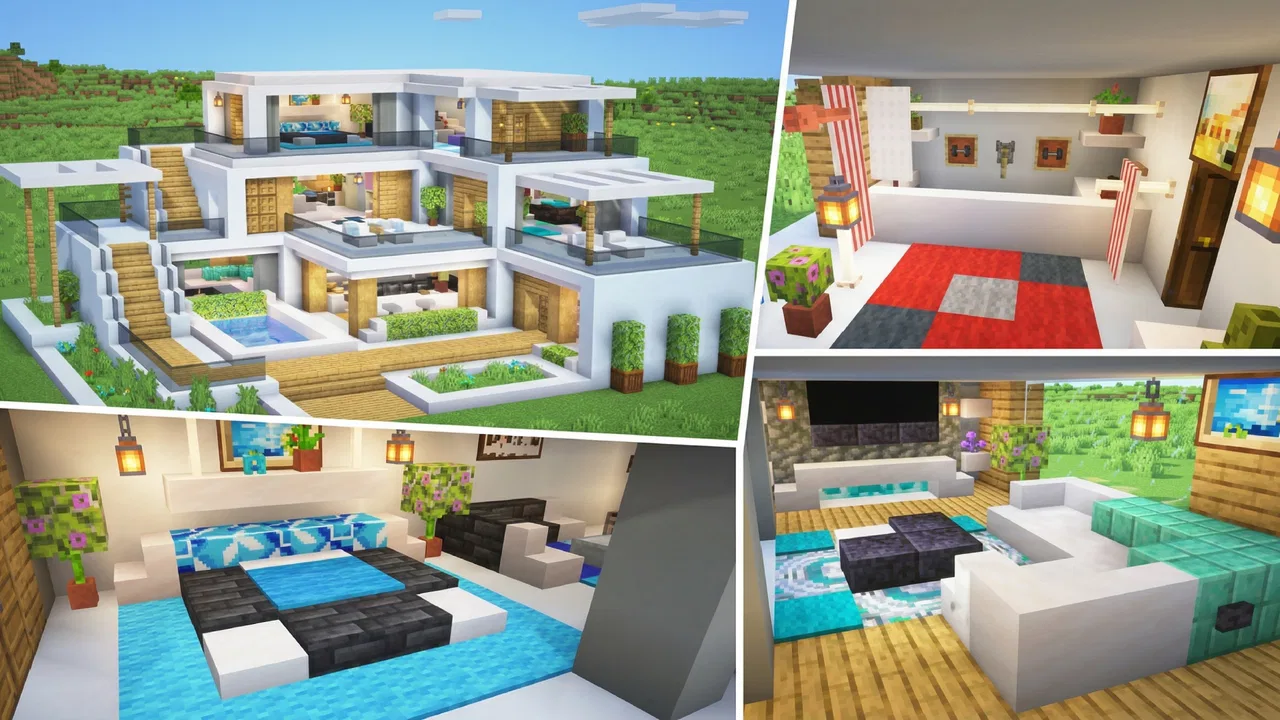
The central pleasure comes from turning an empty area into something that feels personal. I like starting with a practical structure, such as a small shelter or storage area, and then expanding outward once I understand the surrounding space. That approach makes the world feel less like a blank canvas and more like a project with stages: establish a base, improve its layout, and gradually give the area a recognizable identity.
You May Also Like

 Blood Strike: 2.5 Anniversary
Blood Strike’s Loadouts Turn Every Drop Into a Tactical Gamble
A close look at Blood Strike’s custom loadouts: how fast access to signature weapons reshapes its battle royale rhythm, rewards preparation, and narrows the gap between fights.

 Pandora - Music & Podcasts
Pandora’s Music Is Easy to Start, but Harder to Recover
Pandora’s strength is its low-effort path from a seed to a station. Its weak spot is how much confidence it asks you to place in connection, setup, and quiet recovery.

 8 Ball Pool
 Is Built on Rivalries, Rematches, and Routine
A close look at the rivalries, rematches, shared routines, and unanswered safety questions that turn a quick pool match into a persistent mobile community.

 Samsung Music
’s Quiet Strength Is Playing What You Already Own
Its reach comes less from spectacle than from dependable access to a personal library. That simplicity is both the app’s strongest retention engine and its ceiling.

 AccuWeather: Weather Radar
AccuWeather Review: A Quick, Clear Forecast for Everyday Decisions
For everyday plans, the best forecast is the one you can understand quickly. AccuWeather makes rain timing, radar, and local conditions easy to act on, with a few trade-offs.

 Hill Climb Racing
Why Hill Climb Racing Still Turns Crashes Into One More Run
A tiny car, a bumpy hill and one more upgrade: Hill Climb Racing keeps resurfacing because its simple chaos makes every near-miss feel personal.
More From Our News Desk



The game’s block-based design makes experimentation forgiving. If I place something badly, the mistake is visible immediately, and I can adjust the shape instead of spending time managing complex construction menus. This matters on a phone, where precision is naturally less comfortable than using a mouse and keyboard. The straightforward visual language helps me understand what I am doing even when I am playing in short sessions.
I found the combination of building and survival more interesting than a purely decorative mode would be. Survival gives ordinary actions a reason. Finding materials is not just busywork when those materials support a shelter, a safer route, or the next stage of a construction plan. At the same time, the game remains approachable enough for players who mainly want to create rather than constantly fight or optimize.
A useful way to play is to separate a large idea into functional zones. I might reserve one area for the main building, another for supplies, and a third for experiments. This simple habit prevents a common problem in block games: covering the entire starting area with disconnected structures and then feeling unsure what to improve next. Planning the space before placing dozens of blocks makes the game feel far more rewarding.
That advice is especially useful on a small screen. Large projects can become difficult to navigate when every part is built too close together. Leaving paths and open sightlines gives me more room to move and makes it easier to judge whether a building looks balanced. It also reduces the frustration of repeatedly trying to reach one block hidden behind another structure.
Why the simple presentation works
The accessible presentation is one of the game’s strongest practical advantages. I do not need to memorize a complicated interface before I can begin. The block-world format communicates the basics clearly: materials are recognizable, structures are easy to read, and the act of building remains the focus instead of being buried under menus.
That simplicity makes it suitable for casual play. If I have only a few minutes, I can gather a small amount of material or finish one wall. If I have more time, I can work on a larger layout. The same basic controls support both kinds of sessions, which is important for a mobile game that may be played during a commute, a break, or a quiet evening at home.
It also makes the game approachable for younger players. The content rating is Everyone, and the core idea is easy to explain: explore, collect, build, and survive in a block-based world. Adults who want a calm creative activity may appreciate the same qualities, although players seeking a serious survival challenge should keep their expectations measured.
There is a difference between being easy to start and being shallow. In my experience, the first few sessions benefit from the low barrier to entry, while the longer-term value depends on whether I create my own goals. The game does not need to tell me to build a village, a bridge, or a themed base; I can invent those objectives myself. That freedom is enjoyable, but it also means motivation can fade if I prefer a tightly directed campaign.
Small workflows that improve the experience
One of my favorite approaches is to build a temporary working camp before attempting an ambitious project. I keep the first structure compact, use it as a reference point, and explore nearby areas from there. This avoids spending the opening portion of a session walking back and forth across the world with no clear purpose.
I also recommend collecting materials with the next construction step already in mind. Instead of gathering everything indiscriminately, I decide whether I am preparing a roof, a wall, a path, or a decorative section. This keeps the inventory and the building process connected. It may sound like a small change, but it makes survival feel more purposeful and reduces the sense of wandering without progress.
Another useful trick is to build a recognizable landmark early. A tower, an unusually shaped entrance, or a contrasting roof can help me identify the base while exploring. In a block world, navigation is not only about movement; it is also about creating visual memory. A landmark gives the surrounding area structure and makes returning to the main settlement less frustrating.
For larger builds, I prefer constructing the outline first and filling in details later. A rough frame lets me judge proportions before I spend time decorating. If the entrance is too narrow or the roof is too low, I can correct the shape while the project is still simple. This workflow is more efficient than completing one wall in detail and discovering afterward that the whole building feels unbalanced.
Where the game earns my recommendation
The strongest evidence in favor of this game is how quickly it turns a vague idea into something I can see and interact with. I do not need to wait for a long progression sequence before feeling creative. A modest shelter can become a base, the base can become a settlement, and the settlement can become a personal map of decisions I made over several sessions.
That sense of ownership is the reason I would recommend it to someone who enjoys building but does not want a demanding strategy game. The simulation category is a good fit because the satisfaction comes from managing a world and shaping it over time, rather than simply completing a fixed series of levels. I can play with a practical mindset or treat the environment as a blank architectural sketchbook.
The game’s audience is also reflected in its reach. It has passed one million installs and holds a 4.1 average from roughly 5.1 thousand ratings, which suggests that the basic formula connects with a substantial group of players. I would not treat those figures as proof that every player will enjoy it, but they do match my experience of a game designed around immediate, understandable fun rather than a specialized niche.
Its current version is 9146, and it supports devices running Android 7.0 or later. That makes checking device compatibility straightforward for Android users. The practical point is that the game is not positioned as an expensive purchase or a premium commitment: it is free to start, so trying the building loop requires less hesitation than buying a full-priced alternative.
In an everyday scenario, I can imagine playing after work when I want something more active than watching a video but less demanding than a competitive game. I might spend one session improving a path around the base, then return later to add a second building. There is no pressure to complete the entire world in one evening. That gradual rhythm is where the game feels most comfortable.
It can also work well for a parent and child who want to discuss a shared creative idea, provided the child is comfortable with the controls and the adult is willing to help with navigation. One person can suggest a house style or village layout while the other experiments with construction. The simple premise makes it easier to focus on the project rather than explaining complicated mechanics.
The trade-off behind its accessibility
The same simplicity that helps new players can make the experience feel less substantial to experienced sandbox fans. If I compare it with more established block-building alternatives, the usual advantage of those games is depth: more elaborate progression, more specialized tools, or systems that continue unfolding after the basic building loop becomes familiar.
Block Craft - Building World is better suited to someone who values a clean starting point than to someone who wants a highly technical long-term hobby. I would choose it when I want to build directly and decide my own pace. I would look elsewhere if my main goal were complex engineering, extensive customization, or a tightly developed adventure structure.
There is also a creative trade-off. A blank world can feel liberating, but it can feel directionless when I am tired or short on ideas. Players who need constant objectives may wonder what to do next once the first shelter is complete. My solution is to set a specific brief before each session: create a market square, connect two areas with a road, or redesign the entrance. Self-imposed goals turn open space into a manageable checklist without removing the freedom that makes sandbox play attractive.
Mobile controls introduce another limitation. Building accurately on a touchscreen requires patience, especially when working on tall structures or narrow details. I sometimes find it more comfortable to construct broad shapes first and postpone delicate decoration until I have a clear view. Anyone expecting the precision of desktop controls should be prepared to make smaller adjustments and move the camera carefully.
The survival side may also divide players. It adds purpose to exploration and gathering, but a player who wants uninterrupted architectural work may prefer a gentler creative routine. Conversely, someone looking for intense survival pressure may find the building focus more important than the danger. The game sits between those preferences, so its appeal depends on whether that balance matches what I want from a session.
Who should install it, and who should skip it
I think it is a strong choice for beginners, casual builders, younger players, and anyone who likes seeing a project grow over time. It is especially appealing if I want a free simulation game that can be played in short bursts without losing the thread of a larger construction plan.
I would also recommend it to players who enjoy making their own challenges. The most satisfying results come from choosing a theme, organizing a settlement, or improving an area step by step. The game gives me the tools and the space, but much of the long-term motivation comes from the ideas I bring into the world.
I would be more cautious about recommending it to advanced sandbox players who already know exactly which complex systems they want. If my priority is deep automation, a large catalog of specialized mechanics, or a carefully scripted adventure, a more established alternative may serve me better. This game is not a bad choice in that situation; it is simply aimed at a lighter, more direct kind of block-world experience.
The free price makes the decision easier, but free does not automatically mean frictionless. I still need to decide whether the simple loop can hold my attention after the novelty of the first build fades. The best test is to choose a small project with a clear finish line. If I enjoy planning, gathering, and revising that project, the game has a good chance of becoming a relaxing regular activity.
My final view after weighing the strengths and limits
Patane Global has created a block-building simulation that understands the value of an uncomplicated beginning. I can enter the world, make a shelter, explore nearby space, and start shaping the environment without feeling overwhelmed. The game is at its best when I treat it as a collection of personal building projects supported by light survival goals.
My recommendation is therefore specific: choose it if you want a free, approachable creative sandbox with enough survival context to make gathering and construction feel connected. Skip it if you need a deep technical system or a strongly directed campaign. The distinction matters more than the store summary because the game’s enjoyment depends heavily on how much structure I expect it to provide.
For me, the winning habit is to play with a plan but not with pressure. A small base, a visible landmark, and one improvement per session are enough to create satisfying progress. When I follow that rhythm, the world feels personal rather than empty. It is a good pick for relaxed builders who want immediate creativity, provided they are comfortable supplying their own long-term goals.
With an Everyone age rating, free access, and support for Android 7.0 or later, it is easy to recommend as a low-commitment experiment. I would not call it the deepest game in its category, but I do think it succeeds at making block construction approachable and enjoyable. If that is the experience I am looking for, Block Craft - Building World is worth giving a fair session rather than judging it after only a few minutes.
FAQs for Block Craft - Building World
01What is Block Craft - Building World?
Block Craft - Building World is a casual sandbox building game for Android and iOS in which you can create houses, villages, landmarks, and other structures using colorful blocks. It is designed for relaxed, creative play rather than complex survival mechanics, so players can focus on building, decorating, and exploring a block-based world at their own pace.
02Can I play Block Craft - Building World offline?
Many building activities can generally be enjoyed without a constant internet connection, which makes the game suitable for short sessions while traveling or when access to Wi-Fi is limited. However, certain features may require connectivity, including advertisements, cloud-related services, updates, purchases, or online content. Availability can also vary depending on the version and device.
03Is Block Craft - Building World free to download and play?
Block Craft - Building World is typically available as a free download, allowing users to start building without paying an upfront purchase price. Like many free mobile games, it may include optional in-app purchases, advertisements, or premium items that can speed up progress or provide additional content. Check the store listing before downloading for current pricing and purchase details.
04Is Block Craft - Building World suitable for children?
The game’s simple controls, colorful visual style, and creative building focus make it accessible to younger players, but parents should still review the age rating and privacy information for their region. Advertising, in-app purchases, and possible online or social features are worth checking in advance. Parental controls and purchase restrictions can help create a safer experience.
05What devices are compatible with Block Craft - Building World?
Compatibility depends on the specific Android or iOS version, available storage, and hardware capabilities of your device. Before installing, review the official Google Play or App Store listing to confirm the required operating system. Older phones and tablets may run the game with reduced performance, slower loading, or limited visual quality, while newer devices should provide a smoother experience.
Pros
- Easy controls make building accessible for beginners.
- Large selection of blocks supports creative construction projects.
- Open-ended gameplay allows you to play at your own pace.
- Visiting other players’ creations provides design inspiration.
- Works well for short
- relaxing play sessions.
Cons
- Some advanced building options may require in-app purchases.
- Ads can interrupt gameplay
- especially between activities.
- Large worlds may load slowly on older devices.
- Online features may require a stable internet connection.
- The gameplay can feel repetitive after completing several builds.

Block Craft - Building World
Gallery